Learn Git Branching 备忘
本文最后更新于 2025年12月29日 晚上
Learn Git Branching 是个不错的练手教程,可惜长期不用太容易忘了
Learn Git Branching 备忘
- Learn Git Branching 是目前为止最好的 Git 教程了,结合图示 + 通关的教学让人很容易就能上手。然而,很多命令一时间未必会用到。因此对其中常见的命令留作备忘。
Git 基本概念
graph LR
A[工作区] -- git add --> B[暂存区]

subgraph "版本库"
B -- git commit --> C[HEAD]
subgraph "提交树"
C
end
end
变更
提交变更
git commit
撤销变更
reset
# 把分支记录回退到 commit [commit_id]

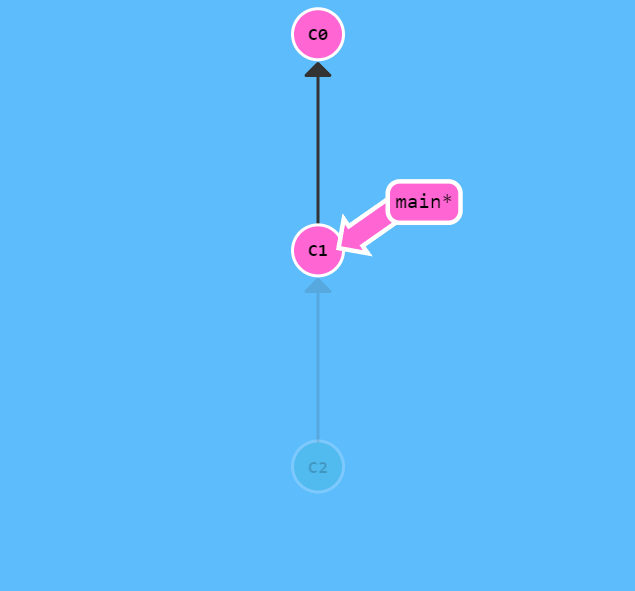
git reset [commit_id]
- 在reset后, C2 所做的变更还在,但是处于未加入暂存区状态
-
--mixed:默认,工作区代码不变,暂存区和本地仓库回滚 -
--soft:默认,工作区和暂存区代码不变,本地仓库回滚 -
--hard:默认,工作区、暂存区和本地仓库回滚
revert
# 提交一个回退到 [commit_id] 的记录

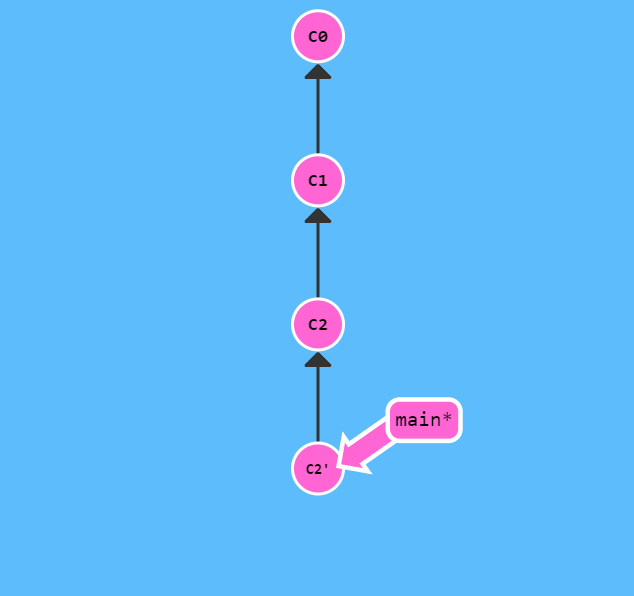
git revert [commit_id]
- 在 revert 后多了一个表示撤销操作的新提交,这样就可以把更改推送到远程仓库了
本地分支
新建并切换分支
git branch -b [branch_name]


# 等同于

git branch [branch_name]
git checkout [branch_name]
强制移动分支位置
# 强制移动 [branch_name] 分支到 [commit_id]

git branch -f [branch_name] [commit_id]
删除分支
git branch -d [branch_name]
合并分支
merge
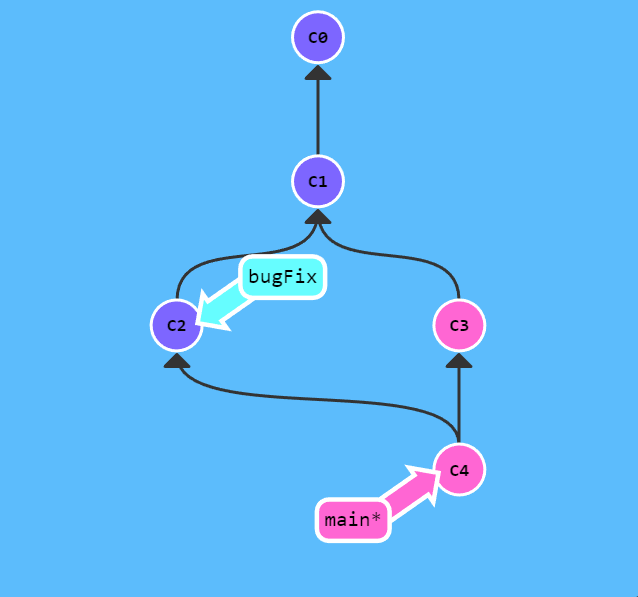
# 当前分支合并了 [branch_name] 分支的所有修改
## 但是 [branch_name] 分支并没有合并当前分支的修改

git merge [branch_name]
rebase
# 提取在当前分支上的改动,然后应用在 [branch_name] 分支的代码上
## 注意,应用就是指接在对应 commit 后,以 [branch_name] 为基

git rebase [branch_name]
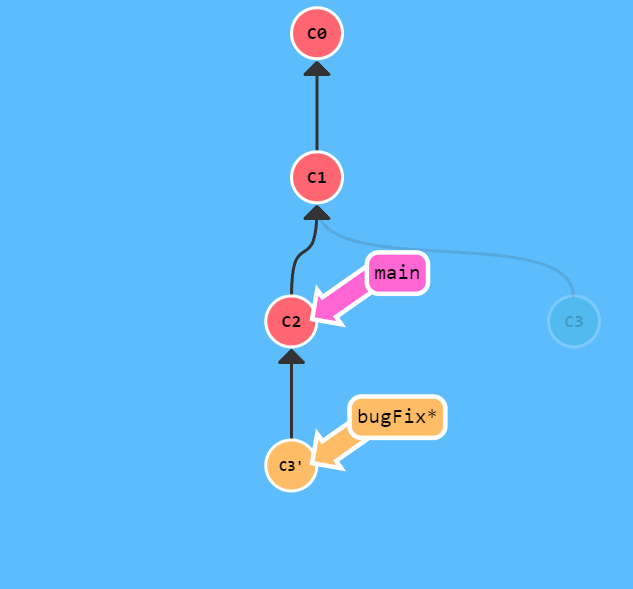
- rebase 使提交树变得很干净, 所有的提交都在一条线上
- merge 则能够保留提交历史
在提交树上移动
查看 HEAD 位置
git show HEAD
分离 HEAD
- HEAD 一般指向分支名,分离则使得它指向具体的 commit
git checkout [commit_id]
相对引用
# [commit_id] 上一个 commit

git checkout [commit_id]^


# [commit_id] 上 <num> 个 commit

git checkout [commit_id]~<num>
自由修改提交树
cherry-pick
# 选取 [commit_id_1] [commit_id_2] ... 提交在当前分支

git cherry-pick [commit_id_1] [commit_id_2] ...
rebase -i
- 交互模式重写提交历史
git rebase -i
锚定提交
tag
- 永远指向某个提交记录的标识
git tag [tag_name] [commit_id]
describe
# <ref> 可以是任何能被 Git 识别成提交记录的引用,默认是 HEAD
## 输出的结果是这样的:<tag>_<numCommits>_g<hash>:距离 tag 有 numCommits 个提交;hash 表示的是 ref_hash 的前几位

git describe <ref>
远程仓库拷贝
git clone [remote-repository-git]
远程分支
- 远程分支命名规范:
<remote repository name>/<branch name>,repository 一般为 origin - checkout 远程分支时,自动进入分离 HEAD 状态
fetch:从远程仓库获取数据
- 下载提交记录 + 更新远程分支指针
- 不影响本地分支
git fetch
- 带参数:到远程仓库的
[place]上,然后获取所有本地不存在的提交,放到本地的o/[place]上。
git fetch [remote] [place]


# 从远程仓库的 <source> 到本地仓库的 <destination>
git fetch [remote] <source>:<destination>

# 在本地创建空分支
git fetch [remote] :<destination>
pull:从远程仓库更新本地仓库
- 下载提交记录 + 更新远程分支指针 + 合并本地分支
git pull


# 等同于

git fetch
git merge origin/master
- 将本地分支工作 rebase 到远程分支
git pull --rebase
向远程仓库提交变更
git push
- 带参数:切到本地仓库中的
[place],获取所有的提交,再到远程仓库[remote]中找到[place],将远程仓库中没有的提交记录都添加上去
git push [remote] [place]


# 从本地仓库的 <source> 到远程仓库的 <destination>
git push [remote] <source>:<destination>

# 删除了远程仓库中的 <destination>
git push [remote] :<destination>
远程跟踪
git branch -u [remote_branch] [local_branch]
Learn Git Branching 备忘
https://justloseit.top/Learn Git Branching 备忘/